The Command Center for Your Entire Field Service Operation
Master your operations with Commusoft’s powerful Job Tracking Software. Manage your entire business from a single screen, with advanced job lifecycle views, asset service records, and direct field-to-office sync.


Streamline Your Operations, from First Visit to Invoice
Instantly see the status of your entire operation from the central job dashboard. Know where your technicians are, what jobs are in progress, their current status, and which need your immediate attention. With customizable job views, you can tailor the job dashboard to show what matters most to you and your role.

Sync Field Workflows
Keep office and field operations seamlessly connected without double data entry. Any job notes or status updates (traveling, on-site, completed) logged by a technician on their mobile phone instantly propagate back to the office, completely eliminating the need to rekey information. Plus, every status update automatically records the technician’s location at that moment, giving your office real-time visibility and a clear audit trail.

Enhance The Customer Experience
Deliver a professional service that impresses your clients. Commusoft’s integrated customer communication tools can automatically send appointment reminders, on-the-way alerts with technician details, and follow-up messages via text or email. This keeps your customers informed and reduces the number of inbound calls to your office.

The customizability is everything. It allows us to go to one place and see every job status at a glance. It’s great being able to sit down in the morning and know exactly where the company and everyone is at in under five minutes.

Master Your Workflow with a Visual Job Pipeline
Never let a job slip through the cracks again. The visual job pipeline allows you to track every job as it moves through each stage of work, from initial booking and scheduling to work in progress, completion, and final invoicing. This clear, intuitive view ensures a smooth handoff between your field and office teams and helps you identify bottlenecks before they become problems.

View Service and Asset Histories
Commusoft links individual assets directly to customer profiles, site locations, and past job records. Every time a technician installs or services equipment, their notes, photos, and completed forms attach straight to that asset, building a clear, accessible service history for the site while giving your team instant context for future visits.
With Total Visibility, Decisions are Simpler
Go beyond basic tracking with long and short-term trend analysis by technician, job type, and custom metrics.


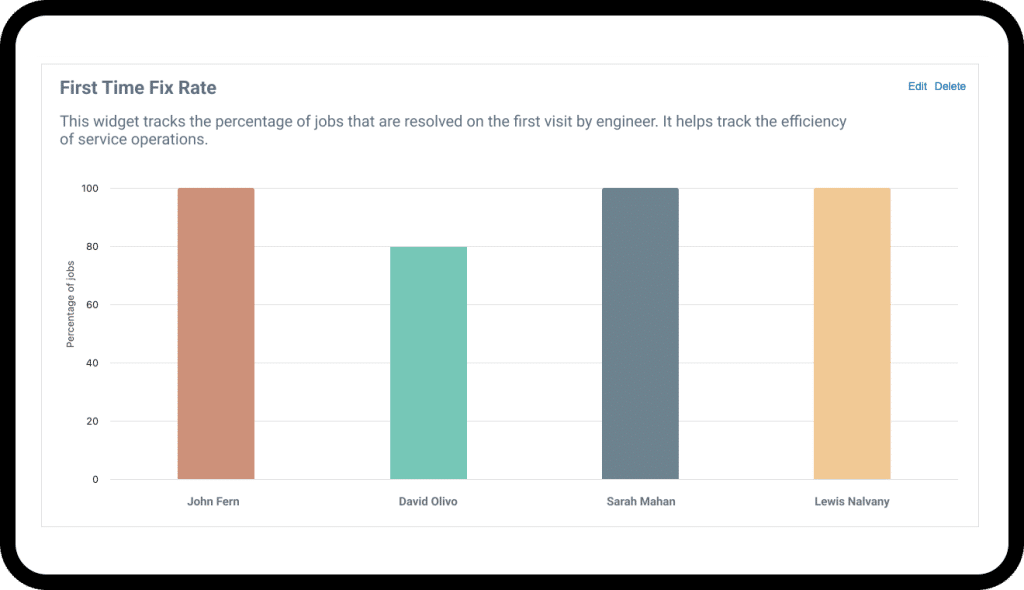


Move beyond basic spreadsheets and start seeing how your business really performs in the field and on the road.

Get the power of complex enterprise reporting without the implementation bloat or "clinical" delays.
Learn why your business succeeds in some areas, and struggles in others, whether that’s first-time fix rates by tech, or other deep reporting insights.

Identify hidden revenue patterns and operational bottlenecks before they impact your bottom line.

Optimize Your Fleet with Integrated Vehicle Tracking
Gain a real-time view of your fleet to improve efficiency and accountability. Our integrated vehicle tracking helps you make smarter scheduling decisions by dispatching the closest technician to an emergency job. You can also monitor driving behavior to promote safety, reduce fuel costs, and have a complete record of your vehicles’ activity throughout the day.
Key Tools for Operational Excellence
Powerful, Real-time Job Tracking
Our leading job-tracking software empowers your field technicians and keeps your office perfectly in sync. From their mobile device, techs can capture notes, take photos, add parts, and complete digital forms. This information syncs instantly to create a complete digital record for every job and asset.
Accelerate Your Billing Cycle
Get paid faster and improve your cash flow. Because job information is captured accurately in the field, the invoicing process is dramatically simplified. Once a job is marked complete, an accurate invoice with all parts and labor can be generated and sent to the customer in minutes, not days, with clear visibility into whether the job is covered by a contract or needs to be charged directly to the customer.
Make Data-Driven Decisions
Stop running your business on guesswork. Our powerful Analytics give you deep insight into your operational performance. Analyze job profitability, job progression status, track technician efficiency, monitor first-time fix rates, and identify trends to make informed decisions that improve your bottom line.


Key Tools for Operational Excellence
Powerful, Real-time Job Tracking
Our leading job-tracking software empowers your field technicians and keeps your office perfectly in sync. From their mobile device, techs can capture notes, take photos, add parts, and complete digital forms. This information syncs instantly to create a complete digital record for every job and asset.
Accelerate Your Billing Cycle
Get paid faster and improve your cash flow. Because job information is captured accurately in the field, the invoicing process is dramatically simplified. Once a job is marked complete, an accurate invoice with all parts and labor can be generated and sent to the customer in minutes, not days, with clear visibility into whether the job is covered by a contract or needs to be charged directly to the customer.
Make Data-Driven Decisions
Stop running your business on guesswork. Our powerful Analytics give you deep insight into your operational performance. Analyze job profitability, job progression status, track technician efficiency, monitor first-time fix rates, and identify trends to make informed decisions that improve your bottom line.
FAQs
How does this software help me manage my technicians in the field?
Commusoft gives you a complete toolkit for field management. You can dispatch jobs to their mobile devices, see their real-time status via the job arrive and job report workflows, and know their location with integrated vehicle tracking. They have all the job history and customer information they need, and they can feed live updates back to the office, ensuring everyone is in sync.
Can I customize the dashboard to see what's important to me?
Yes. We understand that different roles require different information. That’s why we offer customizable job views. You can configure your job dashboard to highlight the key metrics and job statuses that are most relevant to you, whether you’re a dispatcher, a manager, or the business owner.
How does job tracking improve my invoicing?
It makes invoicing faster and more accurate. Because all job details —including parts used, labor time, and completed job reports — are recorded digitally directly on the job in the app, you can generate a precise, itemized invoice with a single click. This eliminates manual data entry, reduces billing errors, and ensures every billable hour and part is accounted for.
Simplify your workflow. Start your free trial today.
Commusoft is a versatile field service software that helps businesses streamline job conversions, optimise scheduling, and enhance customer service.
Commusoft needs the information you provide to contact you about our services. You may unsubscribe from communications at any time. For details, please see our Privacy Policy.

 English (United States)
  English (UK)